Trades
-
Have this same question, now that I am on the first real-life ‘trade day’ (May 3rd) of my 1952 Replay.
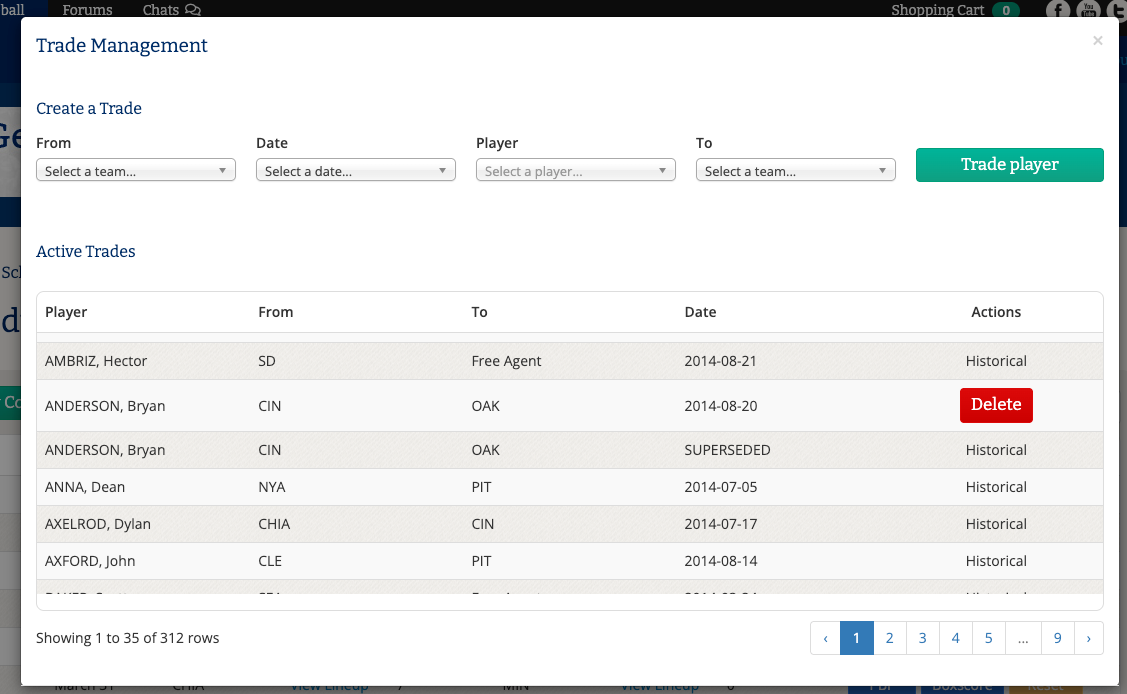
I had assumed you simply hit the DELETE tab… the trade would cease to exist… and the player would go back to the club he was originally rostered on. But that doesn’t seem to be the case with most players (other than those with ‘Historical’ beside their name & under the Actions column).
I’m finding that you actually have to create another trade, in order to properly reverse-deal him back on the correct date.
It’s a little confusing, but I think it’s working. Will find out for sure, once I start opening up these lineups for each game. -
Hi,
Once a player has been traded, if a game involving either the original team or the new team has been played during that period, the trade cannot be reversed unless the relevant game or games are reset.
If the intent is to return the player to their original team, a new trade must be processed to move the player back. Please note that trades cannot be deleted once games involving that player have been played, unless those games are reset.Hope this helps,
-
Hi,
In a replay season, historical trades reflect the real-life transactions for that season and will apply automatically based on the game date you are playing.
If you would like to create your own trade, you can do so in the Replay Menu:
- Go to Replay Session Management
- Click New Replay or select Continue to edit an existing replay
- Click Trade Management
- Select Create Trade and enter the details, including the effective date
Once you create a trade and assign its effective date, you do not need to enter it again. The trade will apply to all games played after that date within the replay.
If an earlier game has already been played with that player on a team, the player becomes locked to that team for that portion of the replay timeline. In that case, the historical trade will display as “Superseded”.
This indicates that your custom trade (based on the earlier effective date and games already played) has overridden the historical transaction.
If you ever want to reverse a custom trade, you will need to manually create another trade to move the player back. Trades are not automatically undone once entered.
Hope this helps,